
How-to
How to change the keyboard font on iPhone
There is no font setting for the iPhone keyboard. The one thing you can change is how heavy its letters are. To see your keys in Didot, a typewriter face or a handwritten one, you need another keyboard — and it helps to know the difference between a font on the keys and “fancy fonts”.
In short. Apple’s keyboard always uses the system font. Settings › Accessibility › Display & Text Size › Bold Text makes it heavier; the text-size slider does not change the keys. For another face, add a keyboard that offers key fonts under Settings › General › Keyboard › Keyboards and pick the font in its app.
What Apple lets you change
Bold Text, under Settings › Accessibility › Display & Text Size, makes text heavier across the phone, the letters on the keys included. That is the whole list: the keyboard has no font, size or style setting, and Larger Text changes the text in apps, not the keys. To make the whole keyboard bigger, see how to make the iPhone keyboard bigger.
A font on the keys is not a “fancy font”
Search the App Store for keyboard fonts and most results are a different thing: they type Unicode symbols that look like letters — 𝓈𝒸𝓇𝒾𝓅𝓉, 𝕕𝕠𝕦𝕓𝕝𝕖, ⓑⓤⓑⓑⓛⓔ. Those paste into any app, but autocorrect cannot read them and screen readers may spell them out. A key font only changes how the keys are drawn. What you type stays ordinary text.
Both have their place. Our fancy-fonts explainer covers when the symbols are fine and when to avoid them.
Key fonts in Pilcrow
In Pilcrow’s theme editor, Letters sets the face for any theme:
- Four faces in every script: system, rounded, serif and mono, with no font download.
- Nineteen font families every iPhone already carries, such as Avenir, Futura, Didot, American Typewriter and Chalkduster, each sized so its capitals are as tall as the system face’s.
- 17 letter styles for the keys — script, fraktur, double-struck, bubbles, small caps and more.
- Letter size from 80 to 130 % of the usual.
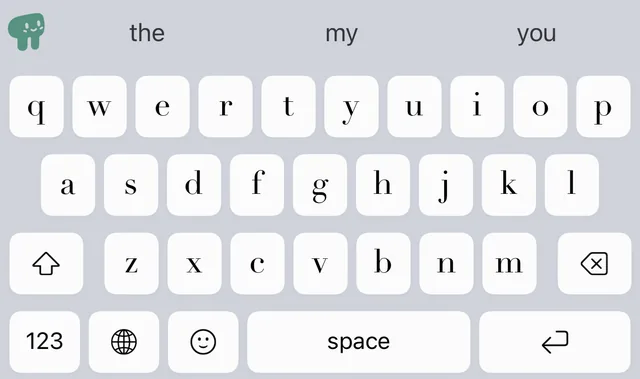
If you want the styled letters in your messages too, Pilcrow has an optional mode for that, off unless you switch it on. Key fonts are part of custom themes, which you unlock after the three free days.
Last checked October 2026 against Apple’s iPhone User Guide for iOS 27. If anything here is out of date, write to info@pilcrowtype.com.
Sources
- Apple, Make text easier to read on iPhone
- Apple, Add or change keyboards on iPhone
- Apple Developer, Configuring open access for a custom keyboard
Read next
- Fancy fonts on iPhone: how they work, and when not to use themThey are not fonts at all. What that means for screen readers and search.
- How to change the keyboard color on iPhoneApple’s keyboard has one colour setting: light or dark.
- How to change the keyboard theme on iPhone, your own photo includedThemes, photos in and behind the keys, and what to check first.
- Pilcrow: the keyboard that never argues backWhat it does, the measured numbers, screenshots and the price.