
Explainer
Fancy fonts on iPhone: how they work, and when not to use them
The 𝓈𝒸𝓇𝒾𝓅𝓉, 𝕕𝕠𝕦𝕓𝕝𝕖-𝕤𝕥𝕣𝕦𝕔𝕜 and ⓑⓤⓑⓑⓛⓔ letters in people’s bios look like fonts, and every app that offers them calls them fonts. They are not. Knowing what they really are explains why they work everywhere — and why they sometimes shouldn’t be used.
In short. “Fancy fonts” are ordinary Unicode characters, mostly borrowed from the blocks meant for mathematics. That is why they paste into any app. It is also why a screen reader may read them as “mathematical bold script t” or skip them, and why search may not find a word written in them. Use them for decoration, never for anything someone needs to read, search or copy.
Where the letters come from
A real font changes how the same letter is drawn. A “fancy font” swaps the letter for a different character that happens to look like a styled version of it. Most come from three places in Unicode:
- Mathematical Alphanumeric Symbols (𝐛𝐨𝐥𝐝, 𝑖𝑡𝑎𝑙𝑖𝑐, 𝓈𝒸𝓇𝒾𝓅𝓉, 𝔣𝔯𝔞𝔨𝔱𝔲𝔯, 𝕕𝕠𝕦𝕓𝕝𝕖-𝕤𝕥𝕣𝕦𝕔𝕜, 𝚖𝚘𝚗𝚘). Mathematicians use a bold x and an italic x to mean different things, so Unicode gave each its own code. The Standard is explicit that these characters
should not be used to represent styling of nonmathematical text
. - Enclosed Alphanumerics (ⓑⓤⓑⓑⓛⓔⓢ). Encoded, the Standard says, for compatibility with older East Asian character sets.
- Fullwidth forms (wide). Also there for round-trip compatibility with East Asian encodings.
Because the mathematical set was never meant to be an alphabet, it has holes. A few styled capitals were encoded years earlier among the Letterlike Symbols — ℂ, ℍ, ℝ — so a generator that does not know this leaves gaps in some words.
How to type them on iPhone
- A generator website. Type plain text, copy the styled result, paste it. Fine for a one-off bio.
- A “fonts” keyboard. Installed like any third-party keyboard: Settings › General › Keyboard › Keyboards › Add New Keyboard, then switch to it with the emoji or switch-keyboard key.
- A keyboard with a styled-letters mode. Switch the mode on, type, switch it off, without leaving the keyboard you normally use.
Whichever you use, the result is the same: the characters travel with the text, so they appear in Messages, Instagram, Notes or a web form exactly as they were typed.
The accessibility problem
A screen reader reads characters, not shapes. To VoiceOver, 𝓉 is not a t at all. The disability charity Scope found that screen readers may skip such characters entirely or read something irrelevant, and gives the example of a single styled letter announced by its full mathematical character name. A whole name in fancy letters can become a string of nonsense, or silence.
The W3C’s MathML specification makes the same point from the other side: using these characters for styled prose creates problems for searching and for restyling, accessibility included. A word written in them is, to a computer, a different word.
When to use them, and when not
- Fine: a decorative line in a bio, a playful message to a friend, a heading on a story image.
- Avoid: your name or username, anything someone might search for, links, addresses, phone numbers, passwords, and anything a person using a screen reader needs to understand.
- A good habit: style a word or two, not the whole message, and keep the important part plain.
How Pilcrow handles styled letters
Pilcrow separates the two things the word “font” gets used for.
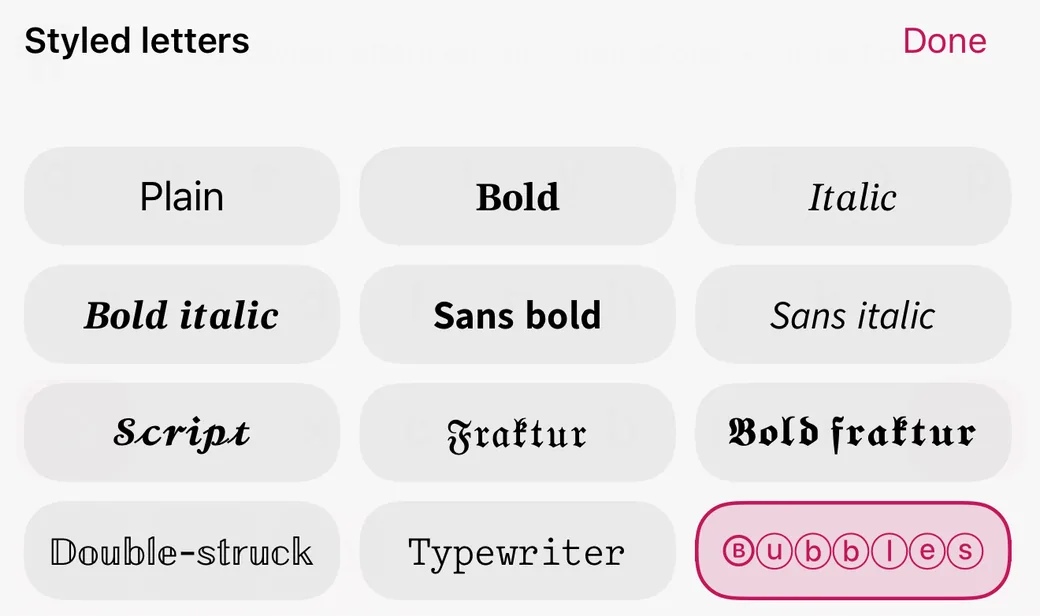
- Styles on the keys. The letters on the keys can be drawn in 23 fonts or 17 letter styles. This is only how the keyboard looks: what you type stays ordinary text, so corrections, predictions and swipe keep working, and nothing reaches the person you write to but plain letters.
- Styled typing, if you want it. An optional mode, off unless you switch it on, writes what you type in a letter style in any app. Accented letters keep their accent on the styled base. While it is on, the bar says so, and corrections, suggestions, learning and swipe pause — a styled word is not a word any dictionary knows, and the keyboard will not pretend otherwise. One tap on Plain turns it off.
Both live on the Themes tab, and the styled-typing chooser can sit on the toolbar so it is one tap away.
Last checked October 2026 against the Unicode Standard, version 18.0. If anything here is out of date, write to info@pilcrowtype.com.
Sources
- The Unicode Consortium, The Unicode Standard 18.0, chapter 22: Symbols (§22.2.1 Mathematical Alphanumeric Symbols; §22.10 enclosed symbols)
- The Unicode Consortium, The Unicode Standard 18.0, chapter 18 (§18.5 fullwidth forms)
- W3C, Mathematical Markup Language 3.0, chapter 7 (§7.5, styled prose and searching)
- Scope for Business, How special characters and symbols affect screen reader accessibility (2021)
- Apple, Add or change keyboards on iPhone (adding and switching keyboards)
Read next
- How to change the keyboard theme on iPhone, your own photo includedWhat Apple’s keyboard lets you change, and what a themed one can.
- How to choose a private keyboard for iPhone: six questions to askFull Access, what it sends, accounts and where predictions run.
- How to spell check on iPhone: every built-in tool, and when to use eachAuto-Correction, red underlines, Writing Tools and Pages.
- Pilcrow: the keyboard that never argues backWhat it does, the measured numbers, screenshots and the price.